


 WorkFlow
Set the review order.
Follow the progress.
Define steps and responsible parties for the document review.
- Use this when needed
- Document review and approval process management
- Where to find it
- Left menu → Workflow
- Classification
- Manage work
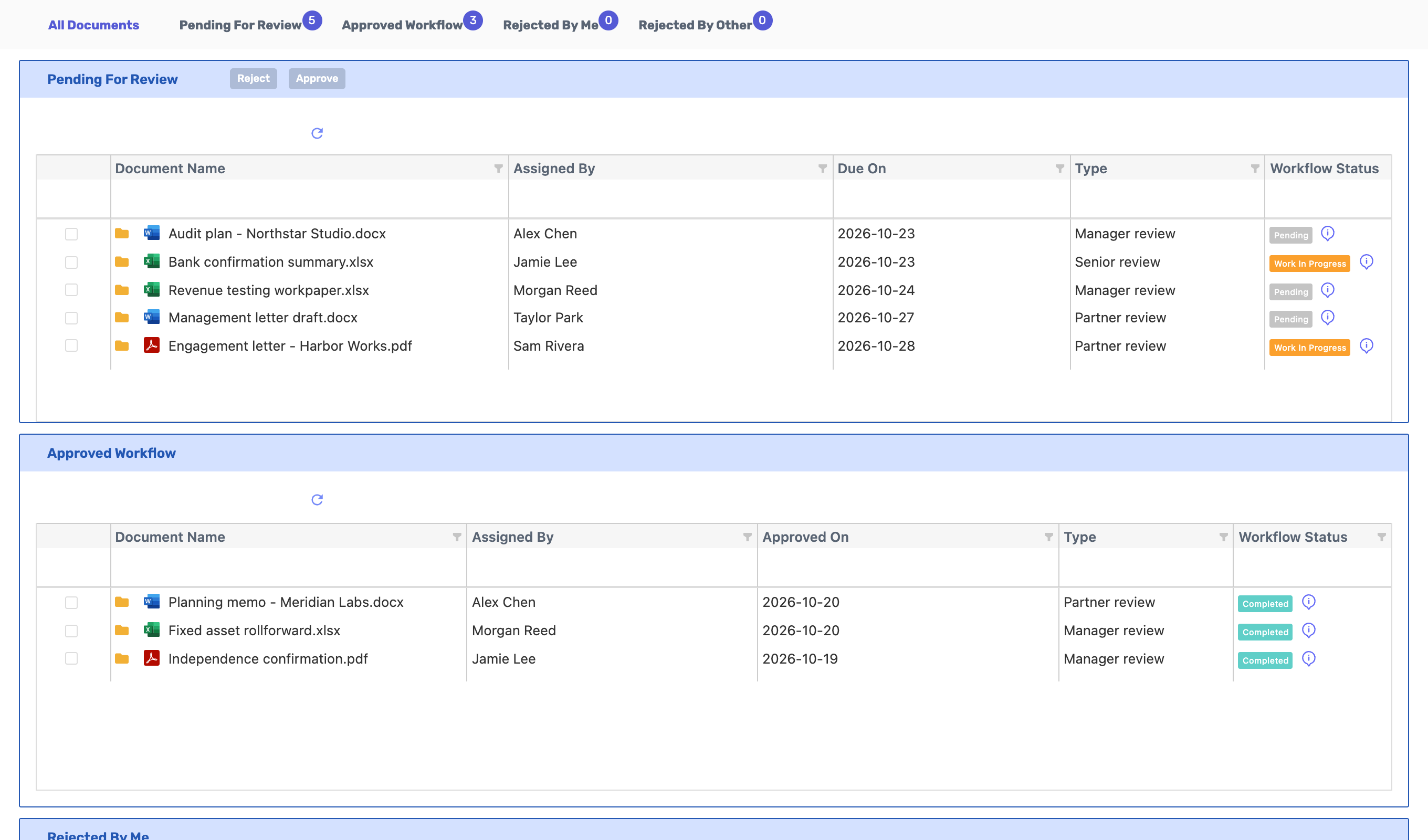
See what needs review and who goes next
Next step is clear.
Connect responsible personnel to review and approval workflow to clearly define the next step of the document.
From the document I'll review
Review content in pending documents and proceed with approval or return, distinguishing your review targets.
Results and reasons together
Review processing status and history per document to see which decisions were made at each stage.
Usage steps
How the workflow fits together
From document selection to review results, see the workflow clearly.
- 1
Select document for review
Check the current version of the file and the document to be reviewed.
- 2
Steps and responsible parties
Define the review stages and responsible personnel.
- 3
Approve or return
Authorized personnel reviews and processes the document.
- 4
View results and history
Review post-return follow-up tasks and approval history, then close the case.
WorkFlow features
Document review workflow
Connect workflows and responsible stages for files requiring review.
- Document-based connection
- Review stage list
- Step-by-step responsible parties
Under review
View documents that require your review and current progress status.
- View pending document
- Document details
- Number of pending items
Approval and return for changes
Change the document status and check approval or return results.
- Approval processing
- Return for changes
- Batch processing
Processing result type
View documents approved by me, documents I returned for changes, and documents returned for changes by others.
- Approval completed
- Returned by me
- Returned by others
History and return path
Review the document's approval history and request a return within authorized conditions.
- Processing history
- Step-by-step overview
- Return conditions confirmation
Apply to multiple documents
Set and manage review workflows, and check processing results by document.
- Batch workflow setup
- Updated
- Delete permission distinction
What to decide before onboardingReview → Approval → Return for Changes → Processing Order
Document to review
Prepare your review file, assigned writers and reviewers, and stage-specific deadlines.
Processing authority
Check approval, rejection, bulk processing, and revision conditions.
Next task
After review, designate who will share and sign off, and specify the responsible party.
WorkFlowFour modules and onward
 Folder AccessLinks review stages and processing history for the same document.
 CalendarCheck your review deadline alongside other work schedules.
 HomeReview your schedule information from home.
 E-SignatureUse reviewed documents for signature requests. Document review completion and signature dispatch are separate steps.
WorkFlow
FAQ
Any other questions? ContactLet us know.
Which document do you use it in?
Link review stages and responsible personnel in document files and check processing history.
Yes, you can process multiple documents together.
You can set up workflows or approve/return documents across multiple documents. The actions available vary based on document permissions and current status.
Yes, you can view returned documents separately.
Distinguish between documents returned by me and those returned by another person.
Yes, after approval is completed, a signature request will be sent.
Document review and e-signature sending are separate steps. After confirming review results, prepare the sign-off request with your team.
Get started with WorkFlow.
Let us know who you'll be working with and which tasks to improve first, and we'll guide you on the required modules and implementation scope.