


 Timesheet
See where your team's
time went this week.
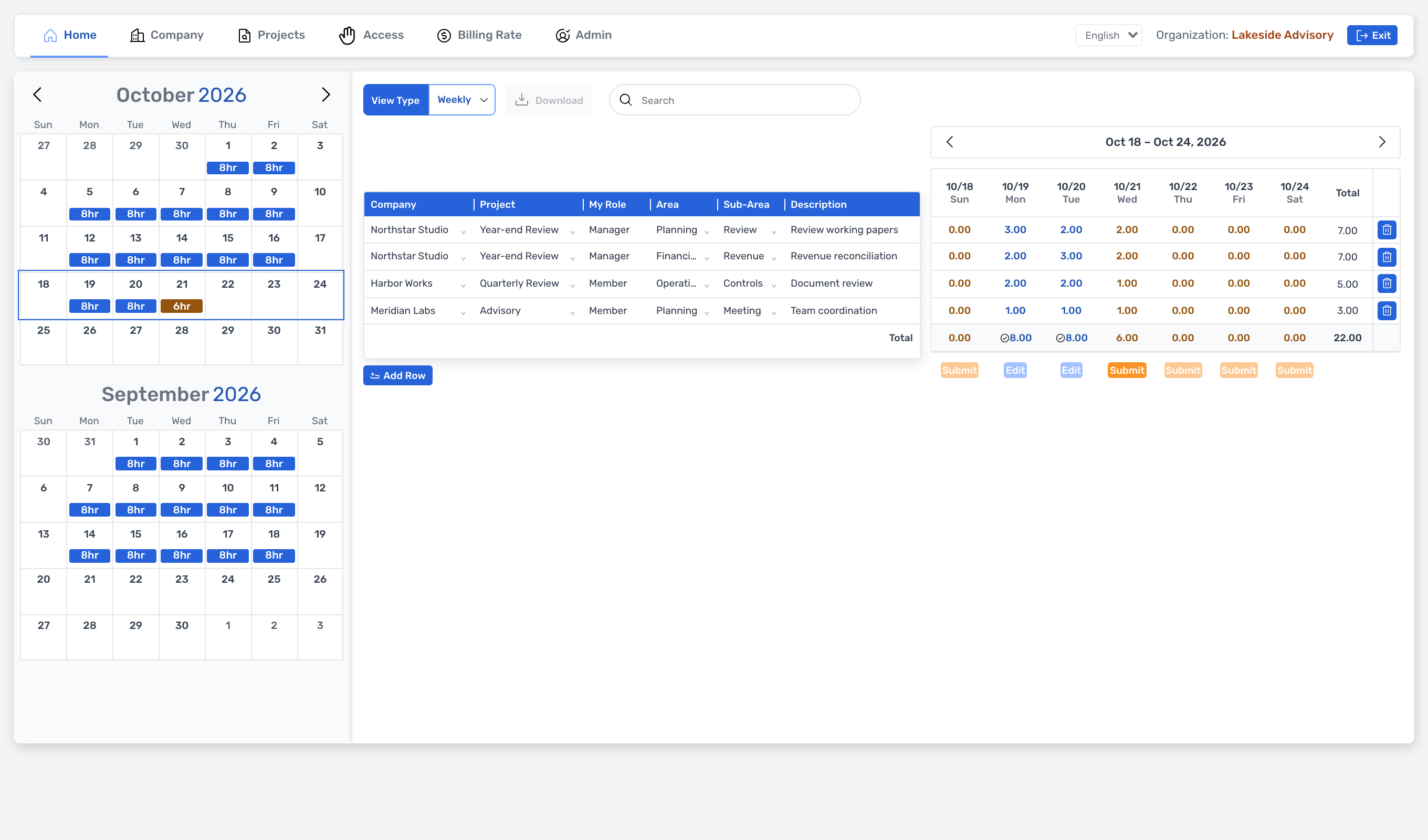
Track project tasks by daily or weekly entries. Distinguish between date-based submissions and edit requests, and review your team's records using the same criteria.
- Use this when needed
- Task-based time tracking and submission/verification
- Where to find it
- Left menu → Timesheet
- Classification
- Manage work
See where project time goes
Name of the task
Track daily time by project and work area to review what you accomplished each week.
Distinguish records from submissions
Track progress by separating ongoing work from submitted records and monitor daily updates.
Keep modification reasons recorded
Once reviewed and approved, we clearly identify the items to be changed.
Usage steps
Log the week, submit it and check its status
Record daily and submit by date.
- 1
Organization and baseline setup
Preparing member access, company, project, and user pricing.
- 2
Time tracking
Select a project and area, then enter daily or weekly time.
- 3
Date-based submission
Stores submission status after input and pricing verification.
- 4
Change review
After submission, edits are requested and managed with admin approval or return.
- 5
Double-check
Admin checks team records and edit requests.
Timesheet features
Enter weekly/daily time
Enter date-specific times for the selected project.
- Weekly grid and daily view
- Monthly calendar status
- Project/Area/Sub-Area Connection
Company and project setup
Company manages your company, and Projects sets up projects and team members or areas.
- Company · Create, edit, delete
- Projects · Create or edit project
- Team assignment and Area setup
Organizational access management
Distinguish work access by organizational membership.
- Organizational selection and onboarding
- Grant or revoke membership
- Admin vs. regular user boundaries
Unit and cost application history
Store user unit price on a periodic basis, with project-specific values taking precedence.
- Periodic Billing Rate·Cost·Currency
- Project-specific exceptions for role, rate, and cost
- Unit rate based on workday basis
Baseline at submission time
Stores submission date and time along with the applicable unit price.
- Submit date restriction
- Unit price and currency missing verification
- Retention of submission criteria and date status
Revisions and resubmission
Submitted records are reopened after approval of requested changes.
- Pending edit request
- Admin Approve/Reject
- After approval, reopen the record to make edits
Review records across the entire organization
Authorized managers view team members' weekly records and edit requests.
- Weekly status by organizational unit
- Request filter and list
- Approval & return workflow
Input validation and weekly record reviewVaries by organization
View available time and weekly records.
- As of Sunday: parking
- Daily total · per-cell time cap check
What to decide before onboardingUser · Permissions · Scope of Provision
Projects and areas
Set your company, project, area, sub-area, and define organizational members with management scope.
Time and application rate
Prepare daily time entries and period-based rates, costs, and currencies, plus project-specific exceptions.
After submission, changes
Submission date is hidden. Define approval and rejection workflows for edit requests, and specify re-submission process.
Timesheet
FAQ
Any other questions? ContactLet us know.
Can you edit the submission time immediately?
Submission date is hidden. Send a request to management for modification and obtain approval before reopening to make edits and resubmit.
Only project-assigned personnel?
Accesses projects and organizations. Verify project assignments and unit price exceptions based on organizational operating guidelines.
Yes, once you enter the time, an invoice is generated.
Manages criteria for time, rate, cost, currency, and submission date. Automatic invoice generation or currency conversion are not included in the provided scope.
What happens if the price changes after submission?
Retain the unit price and currency applicable to the work date at submission. Define your organization's policies for record amendments and resubmissions.
Can you review records together with your team?
Authorized administrators check organizational records and edit requests in Admin. Reports, Archive, and Settings are currently placeholder paths and not available in the menu.
Get started with Timesheet.
Let us know who you'll be working with and which tasks to improve first, and we'll guide you on the required modules and implementation scope.